Launcher OS™
- 4.4
- Rating
- 100.00M
- Installs
- Free
- Price
 Analysis by App-foxy
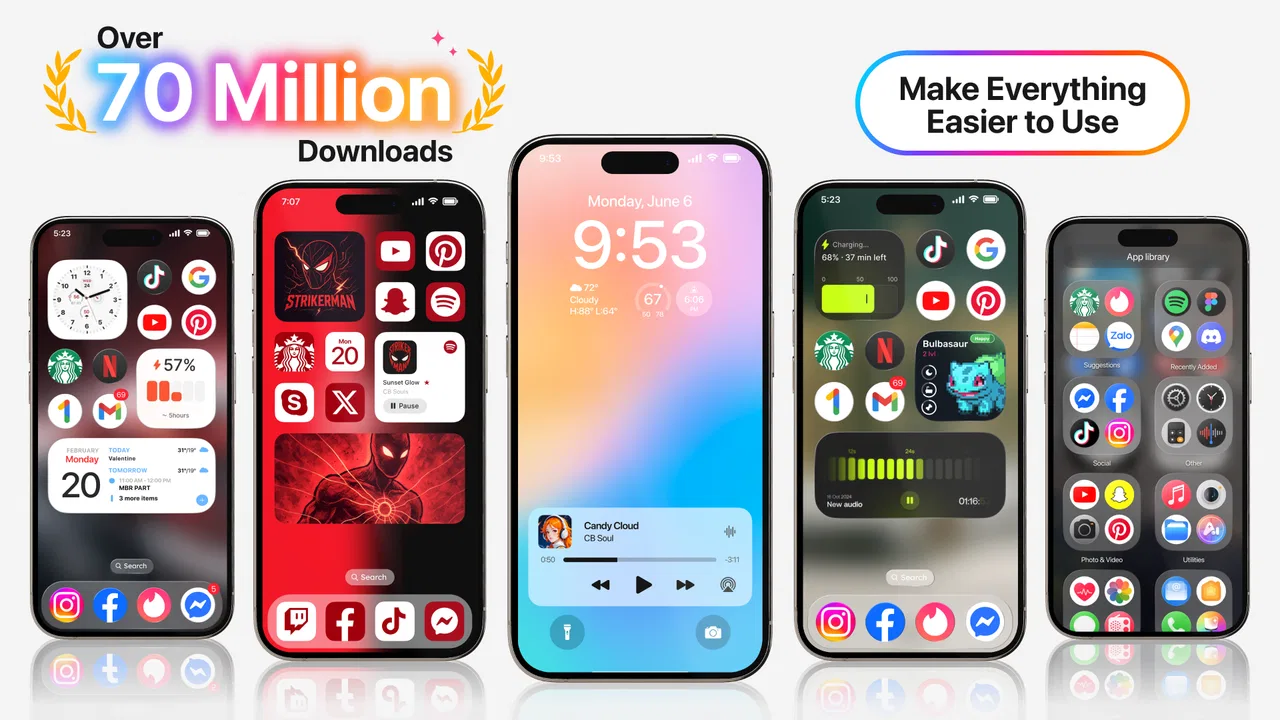
I approached Launcher OS™ as a practical personalization app rather than a simple visual makeover. Its purpose is to change the way an Android phone looks and feels at the home-screen level, with an interface inspired by Apple’s mobile design language. That makes it interesting for anyone who likes a cleaner, more familiar-looking layout but does not want to leave Android.
After spending time with it, my view is fairly clear: this is a good choice when your main goal is appearance and a more controlled first screen. It is less convincing if you want deep system-wide customization, a minimalist launcher with almost no decoration, or a setup that behaves exactly like stock Android. The appeal is immediate, but the long-term value depends on how much you enjoy maintaining a themed home screen.
What to consider before replacing your home screen
The first decision is not whether the interface looks attractive. It is whether you actually want to replace the familiar behavior of your current launcher. A launcher sits at the center of everyday phone use: unlocking, opening apps, searching, checking widgets, and returning home. Even a polished design can feel inconvenient if its gestures, folders, app access, or notification handling do not match your habits.
You May Also Like

 AccuWeather: Weather Radar
AccuWeather Review: A Quick, Clear Forecast for Everyday Decisions
For everyday plans, the best forecast is the one you can understand quickly. AccuWeather makes rain timing, radar, and local conditions easy to act on, with a few trade-offs.

 Hill Climb Racing
Why Hill Climb Racing Still Turns Crashes Into One More Run
A tiny car, a bumpy hill and one more upgrade: Hill Climb Racing keeps resurfacing because its simple chaos makes every near-miss feel personal.

 AliExpress - Shopping App
AliExpress Makes Global Shopping Feel Personal, but Shoppers Bear the Risk
AliExpress turns a global marketplace into a pocket-sized discovery engine. Its reach is useful, its shopping loop compelling, and its trade-offs easy to miss.

 Lords Mobile: Kingdom Wars
Lords Mobile Is a Kingdom-Building Routine, Not a Quick Match
A case-by-case verdict on the building, battles, device demands, and social commitments that make Lords Mobile rewarding for some players and exhausting for others.

 PDF Scanner app - TapScanner
TapScanner Makes Paperwork Easier to Capture, Check, and Share
TapScanner makes scanning with a phone feel less like a rescue operation and more like a dependable step in getting work done. Its capture tools are useful, though not flawless.

 Block Blast!
 Shows How Much a Puzzle Game Can Leave Out
A quiet grid game shows why puzzle players increasingly value instant clarity, repeatable skill and low-pressure play—and where the genre still needs to catch up.
More From Our News Desk
View All News


I would judge this app using three questions. Does the visual style make the phone easier or more pleasant to use? Can I reach the apps and settings I need without extra steps? And does the new layout remain comfortable after the novelty wears off? Those questions matter more than a screenshot because the home screen is something I interact with dozens of times each day.
The app belongs to the personalization category and is developed by Apps Genz. It is free to install, with optional purchases ranging from $0.99 to $79.99 per item. That makes it easy to try without committing money immediately, although I would still pay attention to any optional upgrades before treating the free experience as the complete package.
Compatibility is also reasonably broad for a current Android device: the app requires Android 8.0 or later. Its current version is 6.3.6, so users with older phones should check their operating-system version before planning a switch. The content rating is Everyone, which makes it suitable for a general audience from a rating perspective.
The first setup tells you whether the style suits you
The most important part of the experience happens during the first setup. A launcher can look impressive in promotional images but feel cluttered when it becomes the place where every app is opened. With this one, I recommend taking a few minutes to arrange the home screen around your real routine instead of leaving every suggested element in place.
I usually begin with the apps I use before breakfast, during work, and in the evening. Keeping communication, calendar, maps, music, and camera access close at hand gives the themed layout a practical purpose. If I add too many decorative shortcuts or duplicate access points, the screen stops feeling simple and starts feeling like another layer to manage.
That is one of the less obvious trade-offs here: an Apple-inspired appearance does not automatically create Apple-like simplicity. The result depends heavily on what I place on the screen and how disciplined I am with folders. The launcher provides the visual direction, but I still have to make the information architecture sensible.
Another useful habit is to test the app during a normal day rather than deciding after a few minutes. Open apps from the home screen, return to it repeatedly, search for something less frequently used, and check whether your usual gestures still feel natural. This reveals friction that is easy to miss when simply browsing the settings.
Where the visual approach works best
The strongest part of Launcher OS™ is its ability to give an Android phone a noticeably different personality without requiring a new device. For someone who likes the neat, rounded, icon-focused look associated with iOS, it offers a straightforward route to that style. I can see the appeal for users who have moved between platforms, share a phone with family members familiar with iPhones, or simply want a change from the manufacturer’s default interface.
It can also be useful on phones whose built-in launcher feels visually busy. Some Android interfaces place a lot of emphasis on branded panels, extra suggestions, or manufacturer-specific controls. A themed launcher can make the first screen feel more intentional, especially when I remove unnecessary shortcuts and keep only the tools I actually use.
The app’s store rating is 4.4 from around 1.6 million ratings, and it has passed 50 million installs. Those figures suggest that the concept has broad appeal rather than being a niche experiment. I would not treat popularity as proof that it will suit every phone, but it does indicate that many users are looking for this particular style of Android personalization.
In everyday use, the best scenario is someone who wants a quick visual reset. Imagine a person whose phone has accumulated several pages of apps, inconsistent icons, and a background they no longer like. Instead of spending an evening rebuilding every element manually, this app can provide a more coherent starting point. The real benefit is not only the appearance; it is the motivation to simplify the home screen at the same time.
Practical ways to make the layout less frustrating
I found that the app works better when I separate visual decisions from access decisions. First, I choose a background and overall arrangement that feels calm. Then I decide which apps deserve a permanent position. Trying to solve both questions at once often leads to a screen that looks balanced but hides the apps I need.
For a work-focused setup, I would keep the first screen limited to communication, scheduling, notes, files, and navigation. Entertainment and shopping can move away from the main view. This creates a small but meaningful advantage: the themed design becomes a cue for how I use the phone, rather than just a decorative skin.
A second tip is to keep a record of your previous arrangement before switching. A screenshot is enough. If the new launcher does not suit you, returning to your former layout is less stressful when you remember where everything was. This is especially useful for people who rely on muscle memory and do not enjoy reorganizing their phone repeatedly.
I would also avoid changing the launcher immediately before travel, an important workday, or another situation where quick access matters. Give yourself time to learn the new arrangement. The cost of switching is not normally financial; it is the small collection of pauses and wrong taps that happen while your habits adjust.
Where the usual alternatives may be better
Launcher OS™ should not be treated as the universal answer for Android personalization. If your priority is detailed control over grid sizes, icon spacing, gestures, folders, animations, and behavior, a more traditional power-user launcher may fit better. Those alternatives are usually designed around flexibility first, while this app’s main attraction is its recognizable visual direction.
On the other hand, users who want the least possible change may be happier with the launcher already installed on their phone. The default option usually has the advantage of familiarity and close integration with the device’s own software. If your present home screen is fast, stable, and easy to navigate, switching only for a new appearance may not justify the adjustment period.
There is also a middle group: people who want a clean Android experience but do not specifically want an iOS-inspired one. For them, a minimalist launcher with text labels, an app list, or a deliberately empty home screen could be a better match. The visual language here is part of the product’s identity, so users who dislike that style will probably not be won over by its convenience.
My advice is to compare categories rather than chase a supposed perfect launcher. Choose this app for a themed transformation, a manufacturer launcher for continuity, a minimalist option for reduced distraction, or a highly configurable launcher for fine control. That framing makes the decision much easier than comparing isolated screenshots.
Small limitations that affect daily use
The main limitation is that a launcher can only change the parts of Android exposed through the home-screen experience. It does not turn the entire operating system into iOS. System settings, notification behavior, app interfaces, and manufacturer menus remain part of Android. Anyone expecting a complete platform conversion may be disappointed once they leave the home screen.
The themed appearance can also create inconsistency. Some apps may look perfectly at home beside the new design, while others retain their original visual identity. That is not necessarily a failure, but it means the result may feel more like a customized Android setup than a seamless imitation of another platform.
Another point is maintenance. A launcher is not something I install once and forget if I care about a polished result. New apps, changed routines, and accidental shortcuts can gradually make the layout messy again. The app makes a fresh arrangement easier, but keeping it useful still requires occasional cleanup.
Optional purchases are worth considering in that context. The free entry point is helpful for testing the concept, but users should decide whether any paid elements genuinely improve their routine rather than buying them simply to complete the look. I prefer to use the app for several days first, then spend only if the customization has become part of my daily workflow.
Who will appreciate it most
I would recommend it first to Android users who enjoy changing their phone’s appearance and want a recognizable iOS-inspired home screen. It is also a sensible trial for someone who feels their current launcher is visually cluttered but does not want to replace the phone or learn a complicated customization system.
It may suit families or shared-device situations where a familiar, straightforward layout helps someone feel more comfortable after moving from another platform. It can also work for a secondary phone that needs a quick identity change without a long manual setup.
I would be more cautious about recommending it to users who depend on advanced launcher automation, highly specific gesture behavior, or a carefully tuned stock-Android workflow. The same caution applies to people who dislike themed interfaces or prefer every element to be controlled independently. In those cases, the app’s central strength becomes a limitation.
Performance expectations should be realistic too. A launcher becomes part of the phone’s daily interface, so any delay, unwanted visual effect, or awkward interaction will be noticed more often than a problem inside an occasional app. Before making it permanent, I would test home-screen navigation, app launching, returning from apps, and the behavior of the phone’s normal back and home controls.
How much effort the switch really takes
Changing launchers is easy to begin, but the true switching cost is personal. I have to rebuild habits, decide which shortcuts belong on the first page, and become comfortable with a different visual hierarchy. Someone with a simple phone setup may finish quickly. Someone with several pages of carefully arranged widgets and folders may find the process more disruptive.
That is why I suggest treating the first installation as a trial rather than a permanent commitment. Keep the old arrangement documented, move only the essential apps at first, and use the new layout through ordinary tasks. If the design still feels natural after a few days, continue refining it. If I keep reaching for the old layout or searching for basic tools, that is a sign the visual change is not compensating for the inconvenience.
The app’s release date, May 19, 2020, places it in an established product cycle rather than making it a brand-new experiment. Its current version shows that it has continued to receive development attention, but I still judge it by how well it fits my device and habits. A launcher can be popular and actively maintained while remaining the wrong choice for a particular user.
My recommendation after weighing the alternatives
Launcher OS™ is worth trying if you want an Android phone that feels more polished, coordinated, and visually close to Apple’s design direction. I like it most as a reset button: it encourages me to reconsider what belongs on the home screen and gives an older or visually tired phone a fresh identity.
I would not install it expecting a complete operating-system transformation or unlimited customization. Its best use is more focused: choose it when the look matters, when you are comfortable adjusting your habits, and when a themed home screen is more valuable to you than the deepest possible control.
With a 4.4 average and more than 6 million reviews, it has clearly reached a large audience, and its free price makes experimentation straightforward. Still, the right decision is personal. Try it as a practical home-screen replacement, not as a promise to recreate another phone platform. If the new arrangement helps you find important apps faster and makes you enjoy using your device again, it has done its job. If you mainly want invisible simplicity or technical control, an alternative launcher category will probably serve you better.
FAQs for Launcher OS™
01What features does Launcher OS™ offer?
Launcher OS™ offers a variety of features designed to enhance your smartphone experience. It includes customizable home screens, a wide range of themes, widget support, and an intuitive app drawer. Additionally, it provides gesture controls and quick access to frequently used apps, making your device more user-friendly and efficient.
02Is Launcher OS™ compatible with all Android devices?
Launcher OS™ is compatible with a wide range of Android devices. However, it's always a good idea to check the app's requirements on the Google Play Store to ensure full compatibility with your specific device model and Android version. This will help avoid any performance issues.
03Does Launcher OS™ affect battery life?
While Launcher OS™ is optimized for performance, using a feature-rich launcher can slightly affect battery life. However, the impact is generally minimal. It’s recommended to monitor your device’s battery usage after installation and adjust settings like animations and widgets to optimize power consumption.
04Are there in-app purchases in Launcher OS™?
Launcher OS™ offers a free version with essential features, but it also includes in-app purchases. These purchases unlock premium features such as exclusive themes, advanced customization options, and an ad-free experience. Users can choose to enhance their app experience according to their preferences and budget.
05How do I uninstall Launcher OS™ if I don't like it?
If you decide Launcher OS™ isn’t for you, uninstalling it is straightforward. Go to your device’s settings, navigate to the apps section, find Launcher OS™, and tap uninstall. Make sure to choose a different launcher before uninstalling to avoid interface issues. Your original launcher will be restored once removed.
Pros
- User-friendly interface enhances navigation.
- Customizable themes suit personal style.
- Efficient battery usage for longer device life.
- Quick access to essential apps saves time.
- Smooth transition effects enhance user experience.
Cons
- Limited widget support reduces flexibility.
- Occasional lag on older devices.
- Ads can be intrusive during use.
- Some features locked behind paywall.
- Requires frequent updates to fix bugs.

Launcher OS™
Gallery